
Clients and keys
Outside software runs an organization’s bookmarks through the client API, as one of the organization’s API clients. A client is one piece of software: it calls with its own keys and runs exactly the bookmarks you give it, public or not.
The API section needs View API access to read and Manage API access to change anything; Owner and Admin have both by default. Every change is recorded in the organization’s audit log.
Create a client
Section titled “Create a client”On API or API › Clients, choose Create client:
| Field | Rule |
|---|---|
| Client name | Required, up to 80 characters, unique in the organization whatever its case. Runs the client makes carry this name as their author. |
| Description | Optional, up to 400 characters. Only members see it. |
The client opens on its Keys tab.
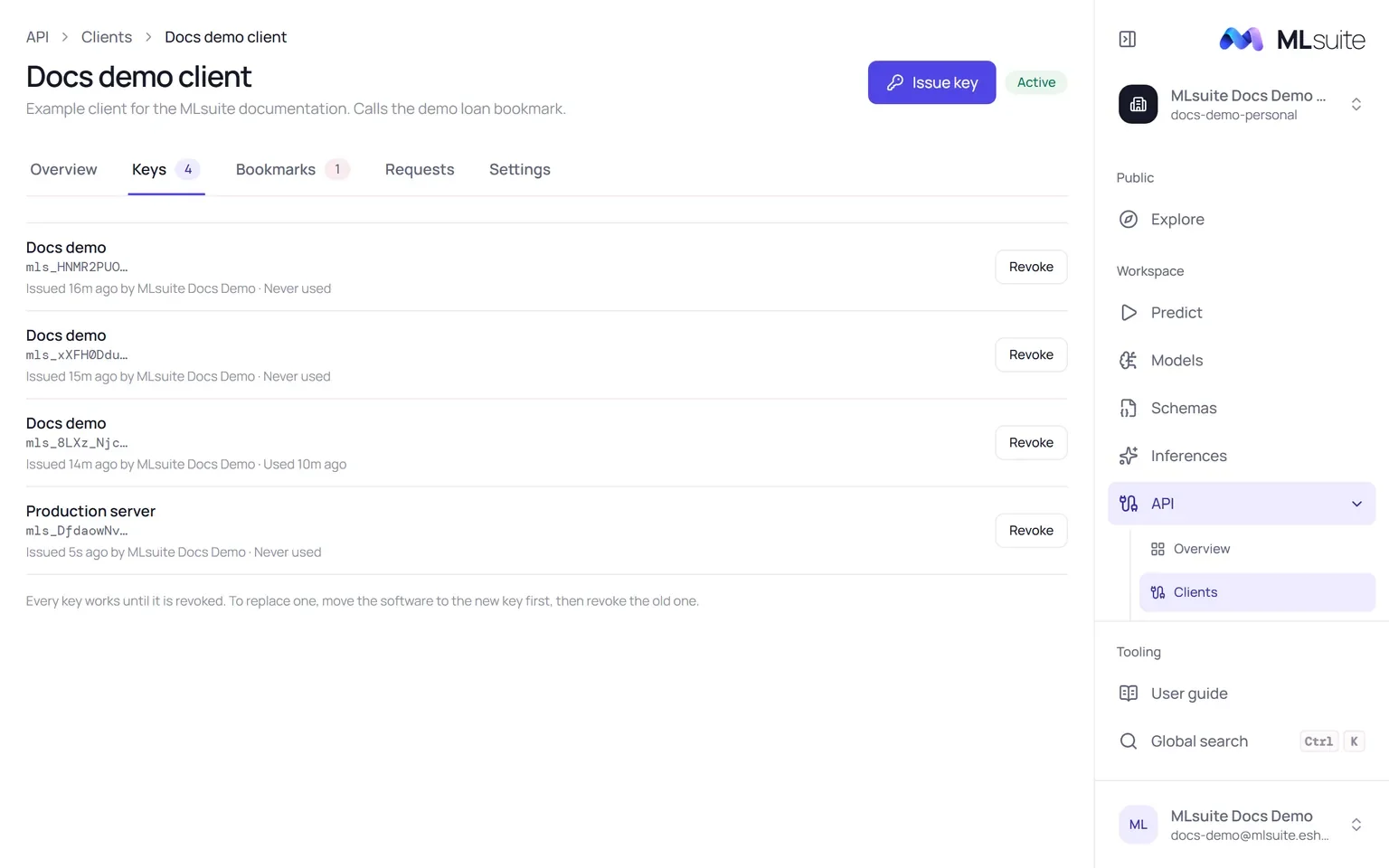
- Choose Issue key and name it after where it will be used, for example “Production”.
- Copy the key. It starts with
mls_and is shown once: MLsuite stores only its SHA-256. Choose I have stored it to close the panel.
Keys never expire. A client can hold several, so you can replace one without stopping the software: move the software to the new key, then revoke the old one. Revoke refuses calls with that key at once and cannot be undone. Each key shows its prefix, who issued it and when it was last used.
Anyone who has a key can run the client’s bookmarks. Keep keys on servers, never in browser JavaScript or a repository.
Bookmarks
Section titled “Bookmarks”The client may call nothing until it is given a bookmark. On its Bookmarks tab, choose Give bookmark and pick one. Each bookmark shows whether the client can run it:
- Runnable: its schema is active and its snapshot binds exactly one model within the size limit (50 MB by default).
- Cannot run, with the reason: the schema is archived, the snapshot binds several models, or the model is too large.
Each row shows the bookmark’s API id, the one used in the endpoint, and a Docs button for its generated documentation. Remove refuses the client’s calls to that bookmark at once; you can give it back later.
Settings and deletion
Section titled “Settings and deletion”The Settings tab edits the name and description; a new name applies to later runs. Delete client stops its keys and removes its access at once. Its past calls stay in the request log and its runs stay in Inferences.
Suspended clients
Section titled “Suspended clients”A superadmin can suspend a client that misbehaves. It then shows Suspended by the platform with the reason given, every call is refused, and it cannot be given new keys or bookmarks until it is reinstated. You can still revoke its keys, remove its bookmarks, edit or delete it.